Smart attention list
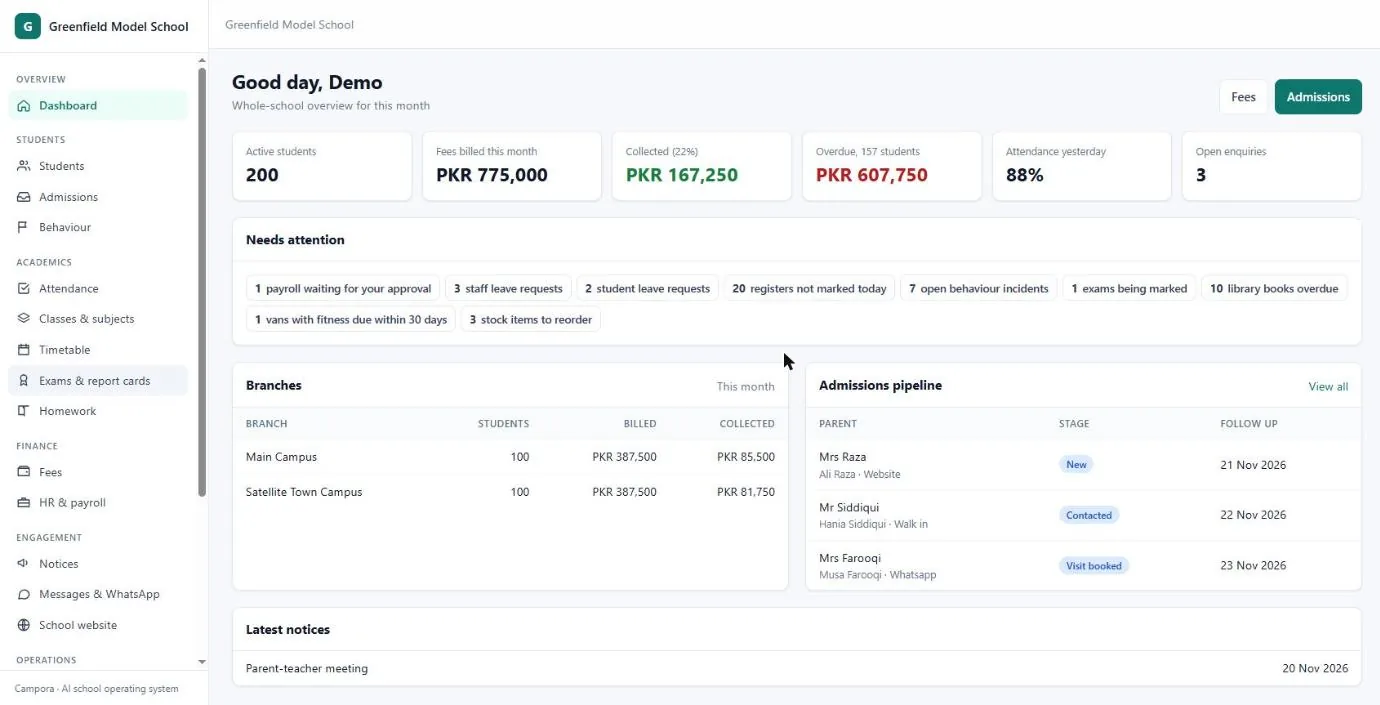
The dashboard picks out overdue fees, low attendance, pending approvals and expiring van papers.
Paperless · Cloud · AI-ready school management
Say goodbye to registers, fee books and receipt pads. Fees, attendance, exams, timetable, payroll, transport, hostel, parents and your school website in one digital system, open 24/7 from any phone or laptop.
 Cloud · 24/7/365 100% paperless✦ AI-ready
Go paperless
Every school runs on paper: attendance registers, fee books, carbon receipts, result sheets, admission files and certificates. Campora turns all of it into digital records that can be searched in seconds, are never lost, and print beautifully only when you really need a copy.
An estimate for a typical school: vouchers, registers, receipts, report cards, notices and certificates. Your own figures will differ.
Cloud, 24/7/365
Campora runs in the cloud, so your school is open on every device, day and night, every day of the year, from the campus, from home or while travelling.
AI for schools
Campora already does the routine thinking for you: it lists what needs your attention today, finds fee defaulters, and alerts parents on WhatsApp when a child is absent. Next, ask questions in plain English or Urdu and let AI draft the work.
The dashboard picks out overdue fees, low attendance, pending approvals and expiring van papers.
Parents hear about absence, fees due and results without anyone typing a message.
Type “who hasn’t paid in Grade 9?” or “attendance this week” and get the answer and the list.
Fair, personal teacher remarks drafted from each child’s marks and attendance, for the teacher to approve.
Spots children whose attendance or marks are slipping, and families likely to fall behind on fees.
Suggests a clash-free timetable that balances every teacher’s workload.
Answers parents on WhatsApp about fees, homework and timings, day and night.
Messages, notices and answers in the language each family prefers.
Students and staff scan in with the QR code on their ID card at the gate.
QR verification · digital results
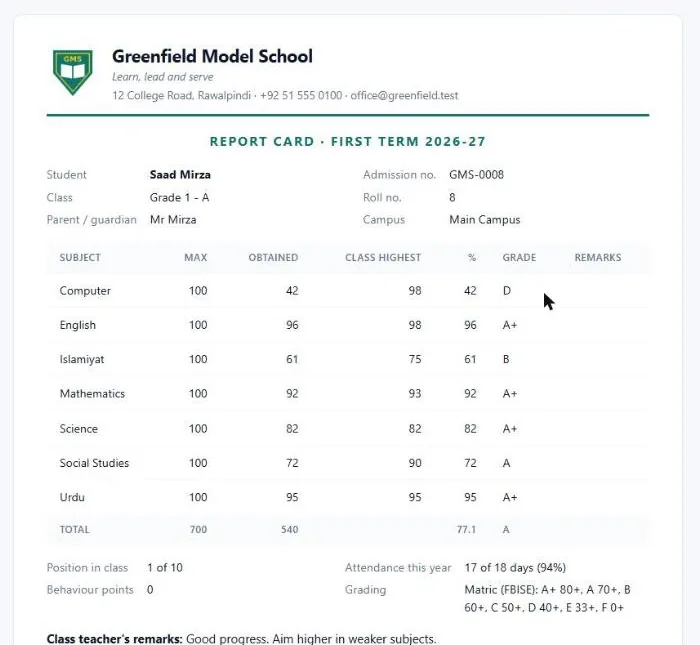
Report cards, certificates, fee receipts and student and staff ID cards carry a QR code. Anyone scans it and sees, live from the school's records, whether it is genuine: a changed or fake printout simply will not match.
Scan this code with your phone camera to try the demo result check. Choose Grade 6 - A at Main Campus, roll number 3, name Sana.
| Paper and spreadsheets | Campora | |
|---|---|---|
| Monthly fee vouchers | Days of writing by hand | Every class in one click |
| Finding a record | Searching through files | Seconds, from any phone |
| Fee defaulters | Counted at month end | Live list, reminders on WhatsApp |
| Parents | Diary notes and phone calls | Alerts, results and fees on their phone |
| Backups | None: fire, water or a lost file | Daily, in the cloud |
| Several campuses | Calls and visits to each one | Every campus on one screen |
| Staff attendance | Sign-in sheet anyone can fill | Check-in only from the campus network |
Classes, subjects, curricula and grades are your own, so one system fits each of these, even side by side in one group.
Playgroup to A Level, Matric or Cambridge grading, report cards with positions.
Quran, Islamiyat, Arabic and Tajweed next to the national curriculum, with separate boys' and girls' wings.
Hifz, Nazra and Dars-e-Nizami classes, halqas as sections, Wifaq-style grades such as Mumtaz and Jayyid Jiddan.
Batches and subjects, monthly fees and results online with roll numbers.
Coming soon: Urdu and Arabic, then more languages, and Hifz progress (sabaq, sabqi, manzil) for every student.
Switch on only the modules you need. Each school can add its own fields, workflows and document designs.
Every campus on one screen: students, fees billed and collected, defaulters, attendance and what needs your attention today.
Profiles, guardians, siblings linked as one family, search across campuses, custom fields per school.
Website and WhatsApp enquiries in one pipeline, follow-up dates, applications and offers with approval.
Teachers mark the register from their phone in under a minute; absent children's parents get a WhatsApp alert.
Monthly vouchers for every class in one click, van and hostel charges, concessions, part payments, receipts, defaulters.
Weekly grid per class, each teacher's week, workload and a clash check so no teacher is booked twice.
Marks by subject, grading for Matric, Cambridge or your own scale, positions and printable report cards.
Teachers set and check homework; parents see what is due and what was missed.
Merits and incidents, points table, parent notes and follow-up of open incidents.
Staff records, leave, salary structures, payroll with a second-person approval and salary slips.
Staff check in and out from their phone, accepted only from their campus network (static IP).
Send to all parents, one class, fee defaulters or one family, with delivery and read status.
Routes, stops, vans, drivers, seat counts and fitness reminders; the van fee goes on the voucher.
Books, loans and late fines, plus school assets and stock that needs reordering.
Rooms, beds, boarders and meal plans; the hostel fee goes on the voucher.
Character, leaving, bonafide and merit certificates with a serial number and online check; ID cards by class.
Your own website with notice board and admission form, on your own domain, built in.
Bring students in from Excel: every row checked before import, and one click to undo.
These are taken from the live demo school, with invented data.
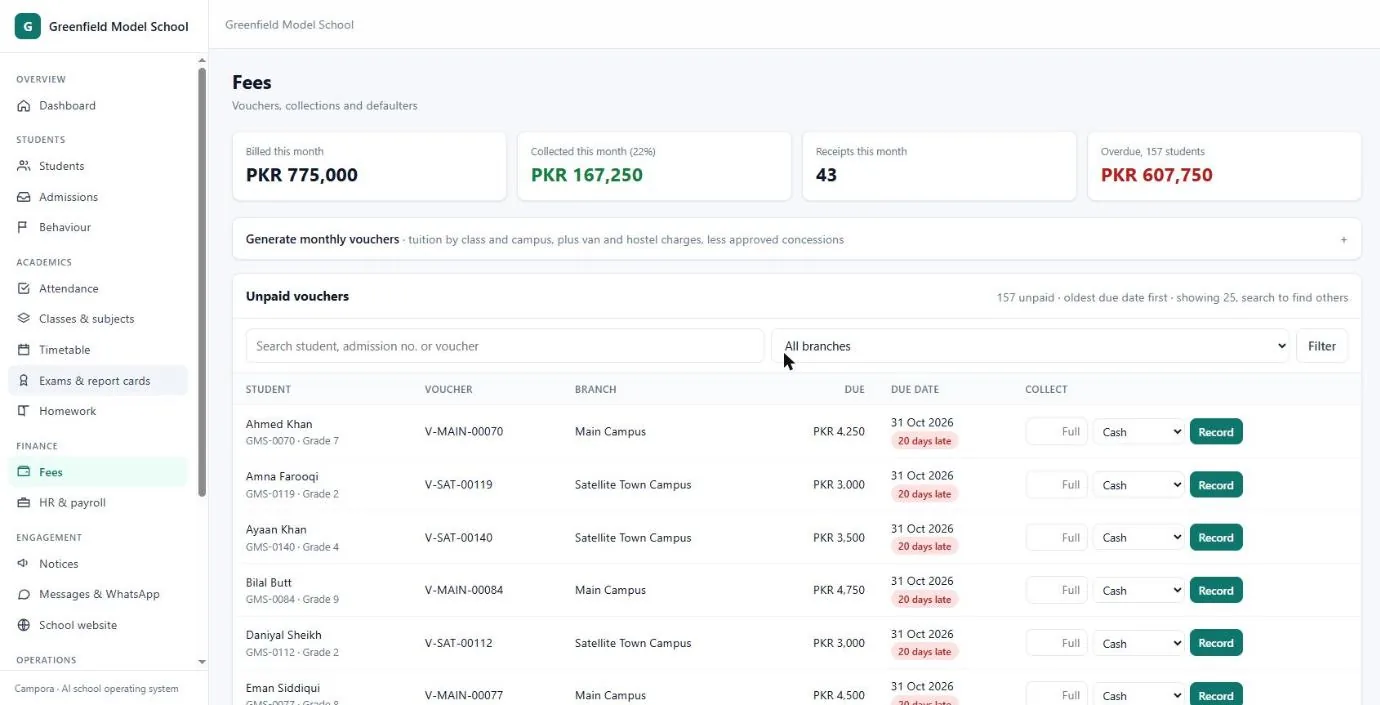
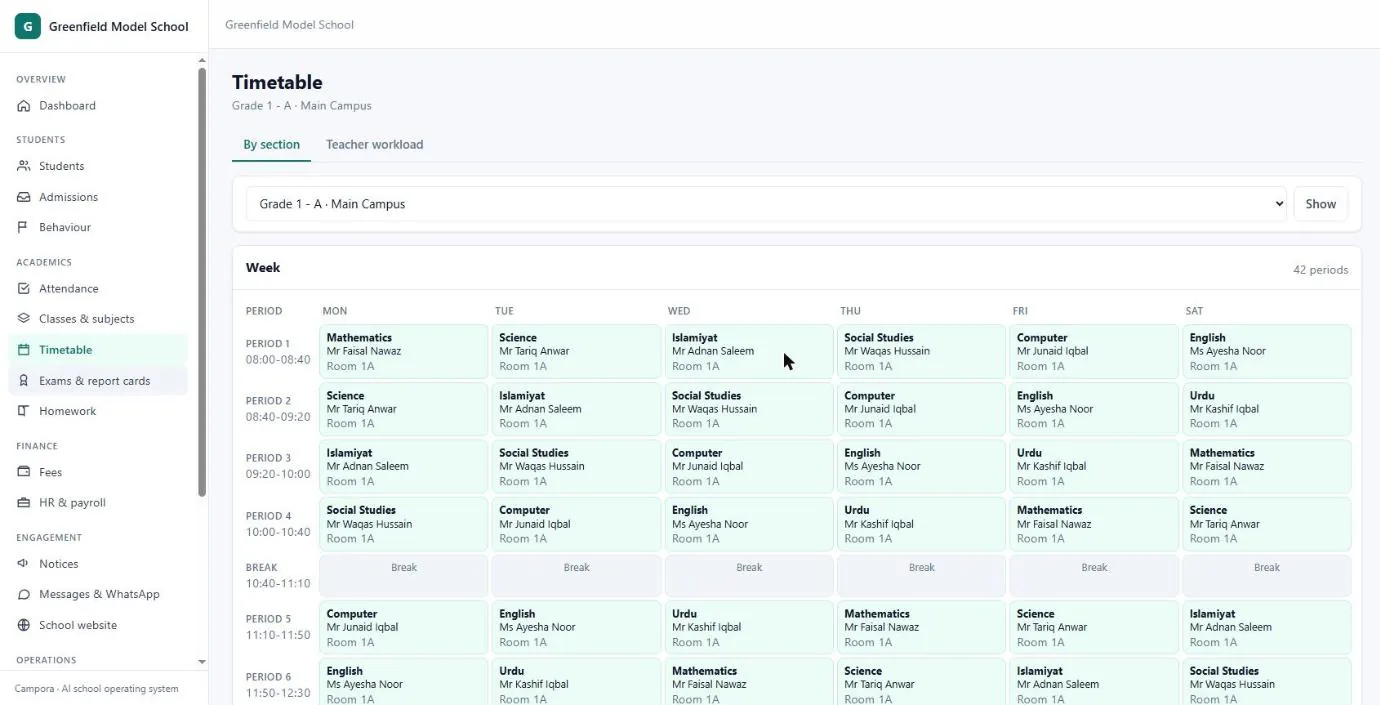
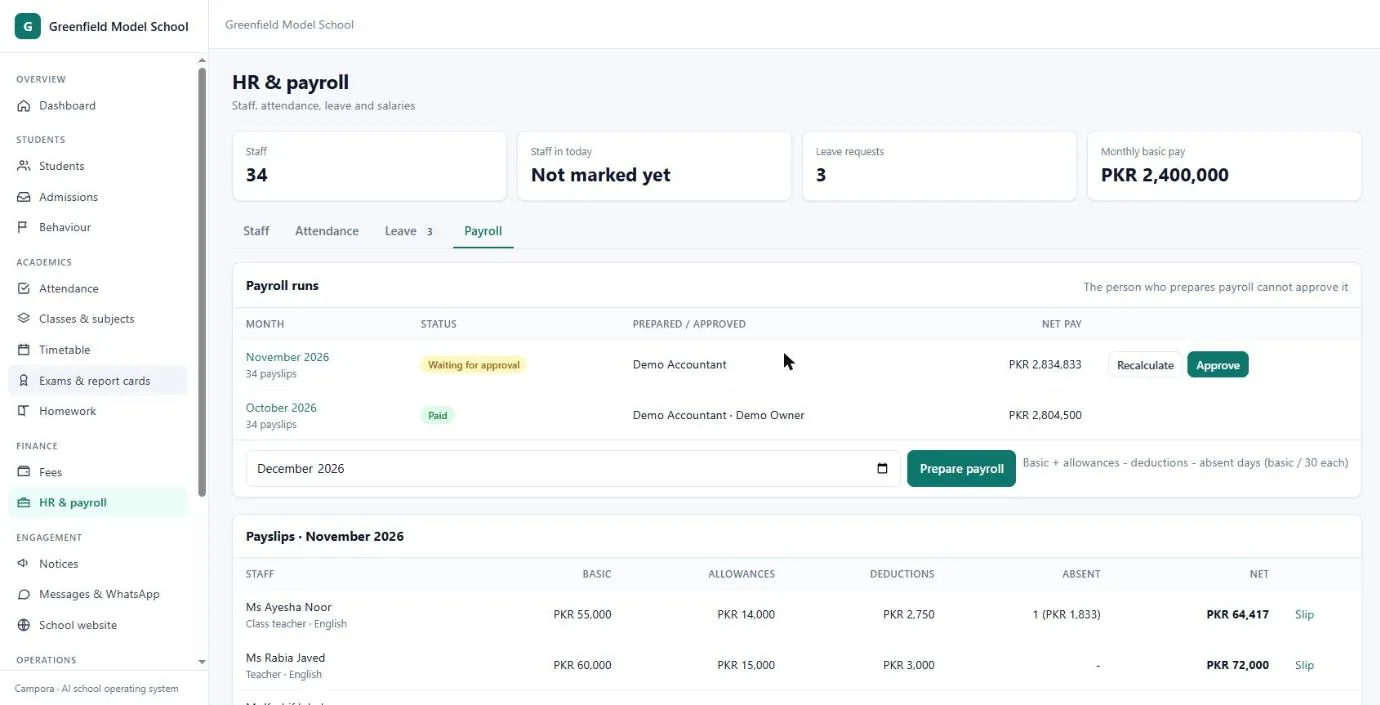
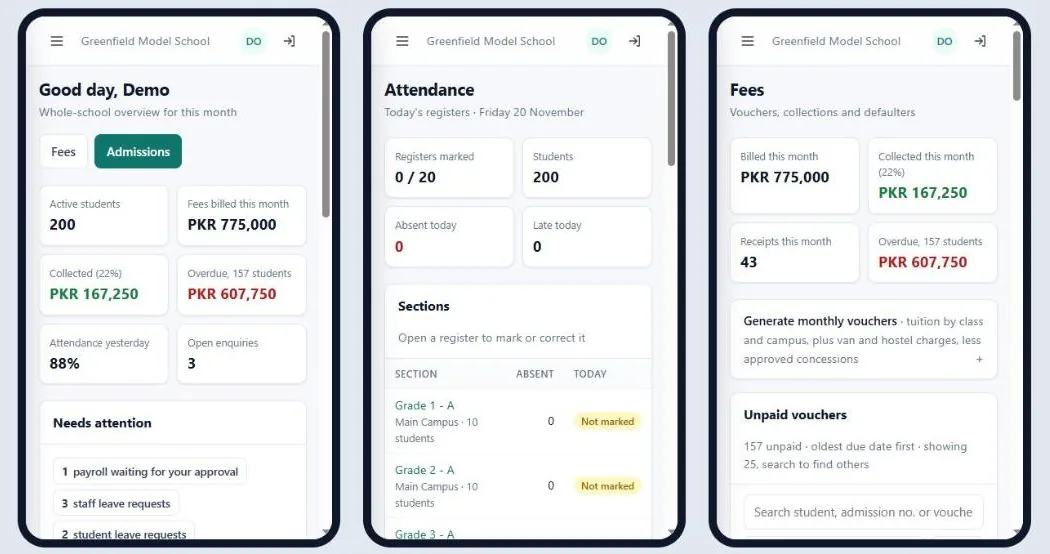
Every screen works on a phone. No app to install: open the school's address and sign in.
Each campus lists its internet address (the static IP from your ISP). Check-in and check-out are refused from anywhere else, so attendance is honest without a fingerprint machine. Late arrivals are marked automatically from your start time, and hours worked feed straight into payroll.
Every school's data is walled off inside the database, not just in the app. Payroll, concessions and refunds need a second person to approve. Every change is logged. Certificates carry a code anyone can check online, so fake ones are caught.
Pay only for active students. 30-day free trial, then monthly. Prices in Pakistan and for international schools.
Rs 10 / student / month
International: $1 per student · One campus
Rs 20 / student / month
International: $2 per student · Up to 3 campuses
Rs 35 / student / month
International: $3 per student · Unlimited campuses
Minimum Rs 2,000 or $99 a month per school. Prices are introductory and may change for new schools.
You get a private copy of a sample school with 200 students. Change anything: it is deleted when you sign out.
Or sign in with the email and password above at the sign-in page. The sample school's website is at /school.
Yes. Each campus has its own classes, fee structures, staff and network settings, and the owner sees them all together or one by one.
Yes. Every screen is built for phones first. Owners approve payroll, teachers mark registers and staff check in from their phones; nothing to install.
You enter each campus's internet address (the static IP from your ISP) in Settings. Staff can then check in and out only while connected to that campus's Wi-Fi, so nobody checks in from home.
Matric and Intermediate boards, O and A Levels, IB, American and your own grading. Each class can follow a different curriculum.
JazzCash, Easypaisa and bank bill payment connect to the fee vouchers. In the meantime every voucher can be paid at the bank or in cash and recorded in seconds.
Each school's data is walled off in the database itself, every change is logged, money approvals need two people, and the system runs behind Cloudflare with daily backups.
Yes. Upload your Excel sheet; Campora checks every row, shows the problems, imports the good rows and can undo an import.
Per active student per month, after a 30-day free trial. No setup fee for schools that import their own data.
For a demo at your school, pricing for a group of schools, or help moving your data, contact our team.